
-
Installation
-
Transform Animation
-
Filter Animation
-
Stack Animation
-
Import/Export Stack
-
Timers
-
Twitch Extension
-
StreamElements Extension
-
Streamlabs Extension
-
StreamerSonglist Extension
-
Stream Deck Plugin
-
Midi
-
WebSocket Server
-
Custom OBS Browser Source
-
TTS (Text To Speech)
Timers are useful for when you need animations to play automatically after a certain amount of time. For example “call-to-action” like Subscribe or Follow
UI
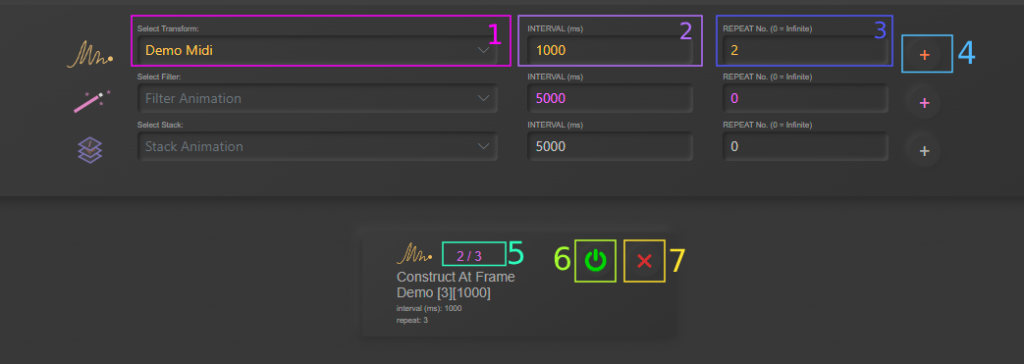
1. Animation Name
2. Interval – Time (ms) between animation replaying.
3. Repeat – How many times the timer will play. 0 = Infinite Loop
4. Add Timer Button
5. Repeat Counter- Only shows if not infinite
6. Start/Stop Timer
7. Delete Timer
Table of Contents